
Node.js and Java: 5 Easy-to-Mix-Up Questions About Runtime, Event Loop, and I/O
How are Node.js and Java different? This article analyzes 5 real-world questions about event loop, Cluster, cold start, WebFlux, Virtual Threads, and frontend/backend runtimes.

Continuing from my earlier posts about Process, Thread, and Virtual Threads in Java, I’ve come to appreciate how powerful Java has become, especially since Java 21. If we look back more than 10 years ago, Java was almost the default choice for many backend systems. But over the last few years, the landscape has changed quite a bit, and a number of new languages and runtimes have emerged that make development faster, lighter, and more flexible.
One of the most prominent names is Node.js — the JavaScript runtime. Even today, Node.js remains one of the most popular choices for backend development, especially when you need strong I/O performance, fast startup, or want to leverage the same JavaScript ecosystem from frontend to backend. And on the frontend side, JavaScript is still basically the king.
This article is not meant to introduce Node.js from scratch. Instead, it focuses on the questions I think many of us have asked at some point: How does Node.js actually work? What is it good at? Where does it struggle? And what are the mechanisms hidden underneath those things that seem so simple at first glance? Let’s get started.
1. How can Node.js handle millions of concurrent requests?
The short answer is: it depends.
Node.js can handle a very large number of concurrent requests extremely well, but that is mainly true when your workload is mostly I/O-bound — meaning the system spends most of its time waiting rather than computing. Typical examples include:
Waiting for the database to return results.
Waiting to read or write files.
Waiting to call a third-party API.
Waiting for network responses.
On the other hand, if your application is mostly CPU-bound — meaning it has to do heavy computation, video processing, data compression, encryption, or complex algorithms — then Node.js is not the ideal choice if you let everything run directly on the event loop.
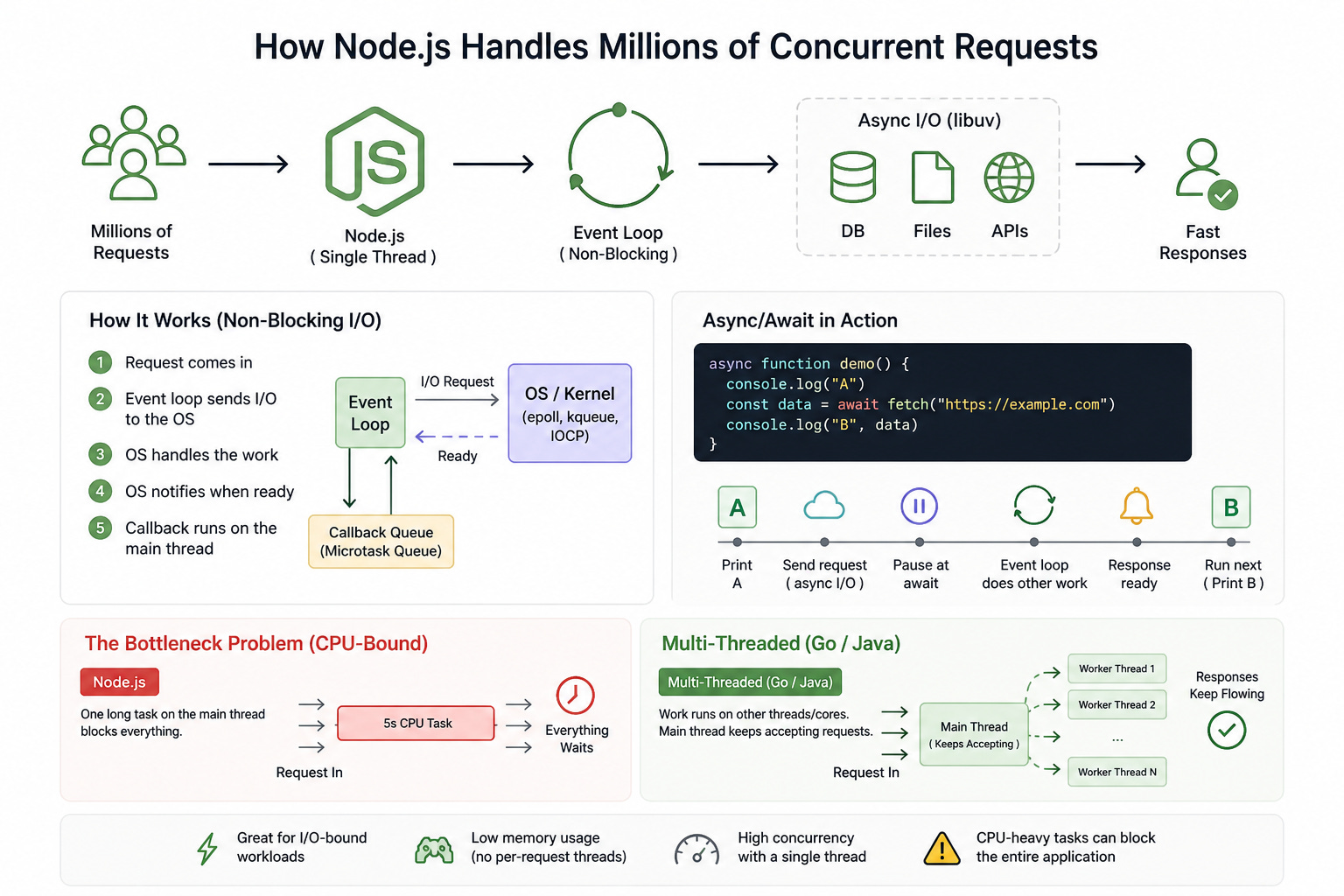
Single Thread and Event Loop
Most traditional frameworks, such as Java-based ones, use a multi-threaded model. In other words, when a request comes in, the framework creates a separate thread to handle that request. If you have one million requests, that could mean one million threads at the same time, which quickly leads to massive memory usage and eventually RAM exhaustion. On top of that, the cost of context switching between those threads can make the application slower instead of doing useful work.
By default, a Node.js process runs JavaScript on a main thread, and that is what makes the event loop so efficient for I/O-bound workloads. At the same time, Node.js still has internal mechanisms and can be scaled across multiple cores when needed.
That single main thread handles incoming work without the overhead of creating a new thread for every request, so memory usage and context switching costs are much lower. The event loop keeps moving tasks into that main thread for execution. Even if your server has many CPU cores, a single Node.js process still primarily runs JavaScript on one main thread.
Non-Blocking I/O
Most of a web server’s time is spent waiting: waiting for a DB result, waiting for file reads, waiting for third-party APIs. With Java before version 21, that usually meant the thread would sit there and block, doing nothing until the result returned.
With Node.js, when an I/O request is made, the event loop forwards that work down to the runtime’s async I/O layer instead of running it directly on the JavaScript thread.
For operations like file access, network requests, or database calls, Node.js relies on the runtime’s asynchronous I/O mechanisms and the kernel. On Linux, this is commonly associated with epoll; on macOS, kqueue; and on Windows, IOCP. These mechanisms let Node register interest in file descriptors or sockets, then wait for the kernel to signal when they’re ready instead of blocking the JavaScript thread.
The important thing is this: the OS does not magically “push data directly into the event loop.” In reality, Node/libuv registers interest in the I/O event, the kernel tracks the I/O state, and once the socket or file is ready, the kernel notifies the event loop that it can continue processing.
How does the OS notify Node.js?
A more accurate way to describe it is:
Node/libuv submits the I/O request to the operating system layer.
The operating system tracks that I/O state.
When the I/O completes or data becomes available, the kernel returns a “ready” signal.
The event loop receives that signal and pulls the corresponding callback or continuation from the queue to run on the main thread.
So it’s not that the file or database directly talks to JavaScript. It’s the kernel plus the event notification mechanism informing the runtime that the resource is ready.
A good way to picture this is with Promise, async, and await. When a Promise is resolved, the code waiting on await does not start executing immediately in the middle of the event loop. It is usually placed into the Promise queue or microtask queue, and it gets priority after the current callback finishes, before the event loop moves to the next phase.
async function demo() {
  console.log("A")
  const data = await fetch("https://example.com")
  console.log("B", data)
}
What really happens is:
Print
ASend the network request down to the async I/O layer
demo()pauses atawaitThe event loop continues doing other work
When the response comes back, the Promise is resolved
console.log("B", data)is queued to run next
Think of it like a restaurant with only one waiter. After the waiter takes an order, he sends it to the kitchen to be prepared. While the kitchen is working, he doesn’t stand there waiting for just one table. Instead, he goes to take more orders or serve other tables. Once the food is ready, the kitchen rings a bell and places the meal in the pickup area. One waiter like that can serve hundreds of tables if he is fast enough.
The bottleneck problem
Because Node.js has only one main thread, if that thread is busy doing a computation that takes 5 seconds, then during those 5 seconds:
It cannot accept new requests.
It cannot respond to tasks that have already been forwarded to the OS and are now ready to return to the event loop.
The whole application can appear to freeze.
In contrast, multi-threaded languages like Go or Java can move that work onto another thread on another CPU core, allowing the main thread to keep accepting requests.
2. Can Node Cluster solve CPU-bound problems?
By default, Node.js runs JavaScript on a single main thread per process, so a single process cannot automatically use all CPU cores. If your server has 10 cores, then the other 9 cores will mostly sit idle.
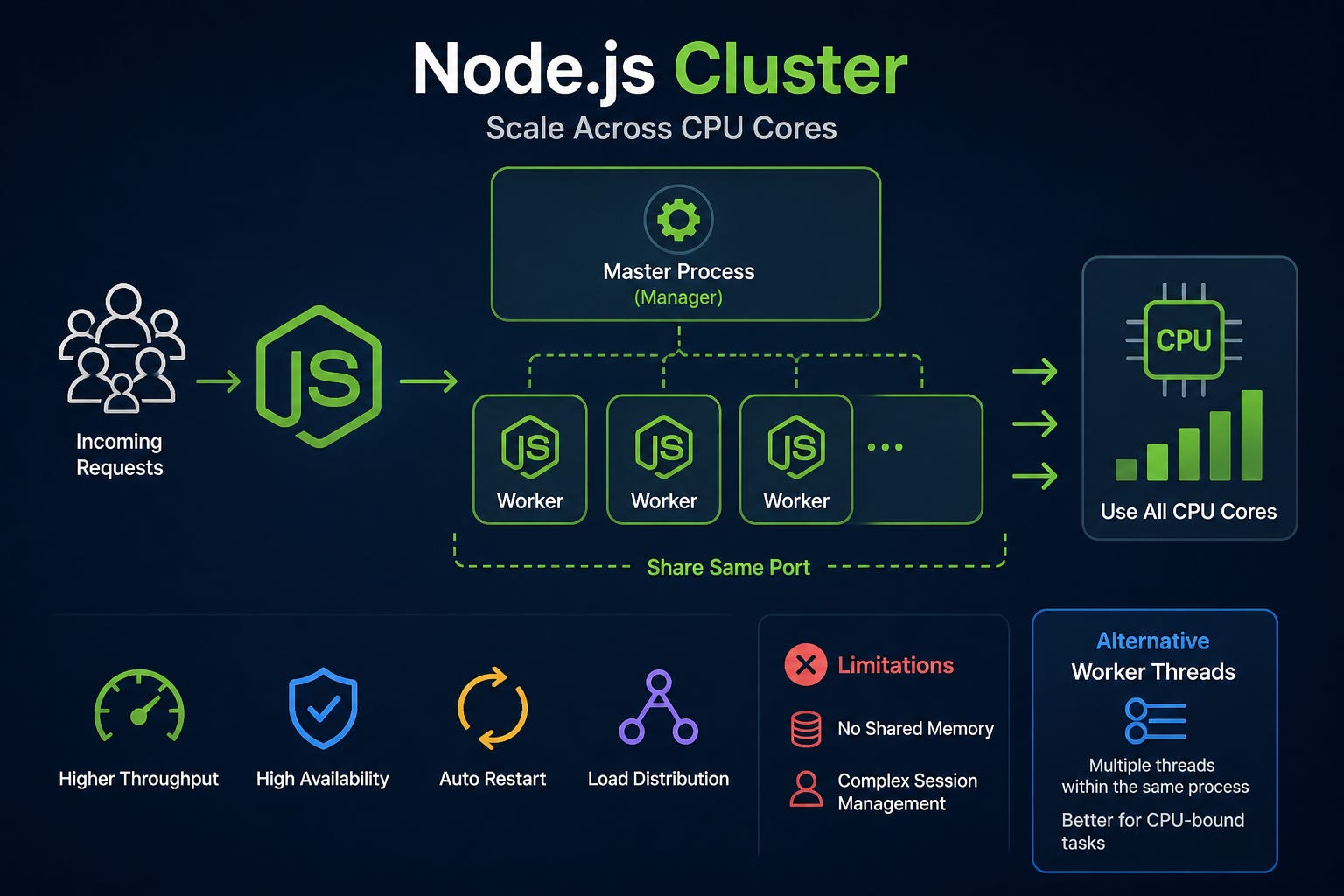
The Cluster module is a built-in feature that allows you to create multiple worker processes running in parallel. These processes share the same network port, which makes it possible to distribute the load across multiple CPU cores.
Master Process: acts as the manager, monitoring and coordinating workers.
Worker Process: individual copies of the application that handle requests directly.
What problem does Cluster solve?
Instead of wasting resources, Cluster lets you run a number of processes roughly equal to the number of CPU cores. Overall system throughput can increase significantly.
If one worker crashes because of a bug, the other workers can keep serving traffic. The master process can also be configured to automatically respawn a new worker to replace it.
When there are multiple workers, if one worker is busy struggling with a heavy CPU-bound task, the operating system and Cluster master can route new requests to other workers that are still free.
Important note: Cluster does not make the heavy computation itself faster, but it prevents one expensive task from bringing down the entire server.
Limitations
Even though Cluster is powerful, it still has some important limitations:
No shared memory: each worker is a separate process with its own memory space. You cannot store a global variable in Worker A and expect Worker B to read it. To share data, you need external tools such as Redis or a database.
More complex management: session management becomes harder because a user’s requests may land on different workers. This is usually handled with sticky sessions or a centralized session store.
Alternative: Worker Threads
If Cluster creates multiple independent processes, then Worker Threads — introduced in Node.js v10.5.0 — let you create multiple threads within the same process.
Cluster is best for scaling HTTP servers and I/O-bound workloads.
Worker Threads are better for heavy CPU-bound tasks inside a single instance because they can share memory through
SharedArrayBuffer, which makes data exchange very fast.
So if you want your Node.js application to perform CPU-bound tasks without blocking the server, you should either use Worker Threads or move that work into a separate service written in a language that is stronger for heavy computation.
3. Why does Node.js start faster than Java?
From a practical point of view, Node.js usually starts faster than Java, especially compared to Java applications that use heavyweight frameworks like Spring Boot. That does not mean Java is “slow.” It simply means Java and Node.js have different startup models, different initialization costs, and different design philosophies.
A simple analogy:
Node.js is like a motorcycle: you turn it on and it’s ready to go.
Java is like a bus: before it starts moving, it needs to go through several preparation steps.
This analogy is not meant to say one technology is absolutely better than the other. It just highlights that Node.js usually has a lower startup latency.
Interpreted vs Compiled
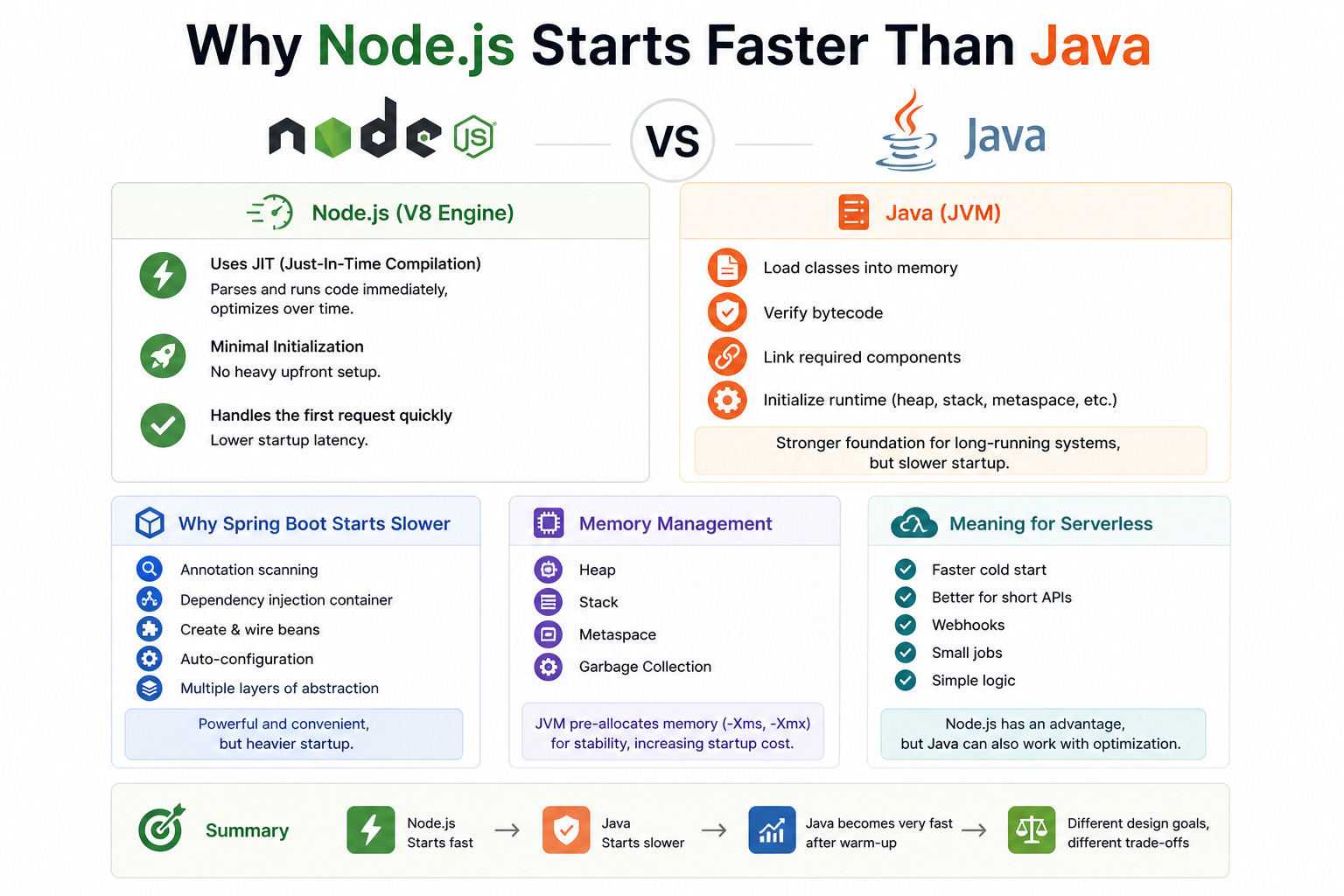
Node.js runs JavaScript on the V8 engine. V8 does more than just “read code and run it.” It uses JIT (Just-In-Time Compilation). When the application starts, V8 can parse and execute code very early, then gradually optimize the parts that are used frequently.
In other words, Node.js does not need to prepare too much before handling the first request. It can start working quickly and optimize over time.
Java, on the other hand, runs on the JVM, and the JVM typically has to do more work during startup:
Load classes into memory.
Verify bytecode.
Link required components.
Initialize runtime structures such as heap, stack, metaspace, and other internal components.
These steps give Java a very strong foundation for long-running systems, but they also make startup slower than Node.js in many cases.
Why does Spring Boot start slower?
When comparing Express in Node.js with Spring Boot in Java, the difference becomes even more obvious:
Node.js follows a minimalistic philosophy. You require only what you need. Things remain relatively lightweight and isolated, and unused components do not need to be initialized early.
Java, especially with frameworks like Spring Boot, often uses annotation scanning and dependency injection. During startup, it has to scan the project for things like
@Service,@Controller, and@Component, build the dependency injection container, create and wire beans, apply auto-configuration, and set up multiple layers of framework abstraction.
That is why Spring Boot startup tends to feel heavier. But this is not a flaw — it is the cost of a powerful and convenient enterprise framework. Java was built for systems that need to run for a long time, stay stable, scale well, and handle sustained traffic.
So the JVM accepts a higher startup cost in exchange for stronger optimization later. Once the system warms up, the JVM can become very fast, especially for workloads that run for a long time and have repetitive patterns.
Memory management
Another reason Java often feels heavier at startup is memory management. The JVM typically initializes memory areas such as:
Heap
Stack
Metaspace
Garbage Collection structures
In many production systems, Java is also configured with parameters such as -Xms and -Xmx to define the initial and maximum memory size. This helps the system remain stable during long-running execution, but it also increases startup time and initial resource usage.
Node.js usually has a lighter startup footprint, especially for small or medium applications. However, actual memory usage still depends on code, dependencies, caching, and workload. Saying “Node.js is always light” is too absolute, but saying “Node.js is usually lighter at startup” is reasonable.
Meaning for serverless
This is where Node.js often has a very clear advantage.
In serverless environments such as AWS Lambda, startup latency — or cold start — directly affects user experience. Because Node.js typically starts faster, it is often chosen for:
Short APIs
Webhooks
Small jobs
Simple logic that needs to respond quickly
That said, it is also not correct to say Node.js is “the winner in all cases” or “always the best.” Java can absolutely be used in serverless, especially when optimized correctly. There are also now techniques that significantly reduce Java cold starts, so Java is no longer the “too slow” option it used to be.
4. What improvements has Java made to compete with Node.js for I/O-bound workloads?
If Node.js was once considered the strongest choice for I/O-bound workloads, Java has now made major improvements that close the gap — and in some cases even outperform it. The two most important directions are Reactive Programming with WebFlux and Virtual Threads in Java 21.
Reactive Programming
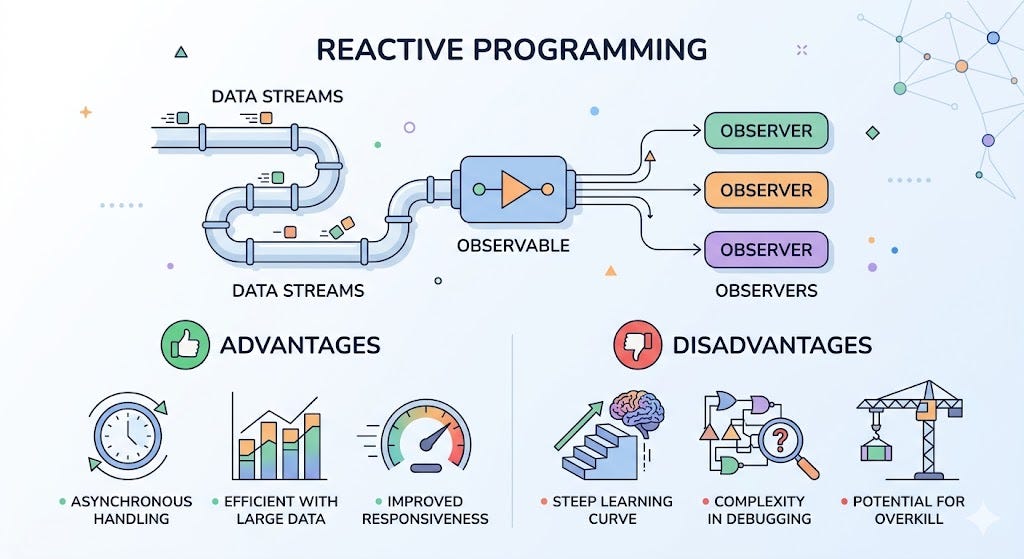
WebFlux is a non-blocking reactive model in the Spring ecosystem. Its goal is to handle many concurrent requests without keeping one blocking thread per request, as in the traditional model.
The strengths of WebFlux include:
It fits systems with a lot of I/O.
It uses system resources very efficiently.
It increases throughput when there are many concurrent connections.
It is a great fit for streaming workflows or services that call each other frequently.
The way WebFlux works can remind us of Node.js because both follow an event-driven, non-blocking style. However, WebFlux is not “Node.js in Java.” It is a reactive approach built on the Spring ecosystem, often running on a non-blocking runtime such as Netty.
The important thing is that WebFlux does not automatically solve CPU-bound problems. If you put heavy computation on the same event loop or structure your reactive pipeline poorly, you can still block the system. So WebFlux is strong for I/O-bound workloads, but it is not the answer for every kind of workload.
In short, WebFlux is a good fit when you need:
A high number of concurrent requests.
More I/O than computation.
End-to-end non-blocking behavior.
Efficient thread usage.
The trade-off is that it is more complex. Reactive code is often harder to read, harder to debug, and requires the team to be comfortable with data flow, backpressure, and asynchronous thinking.
Virtual Threads
Starting with Java 21, Java introduced Virtual Threads, one of the most important features since Java 8, especially with its deep integration into Spring Boot 3.2.
Virtual Threads let you create a huge number of lightweight threads, but these threads do not map 1:1 to OS threads. Instead, they are managed by the JVM scheduler and shared across a smaller number of underlying OS threads.
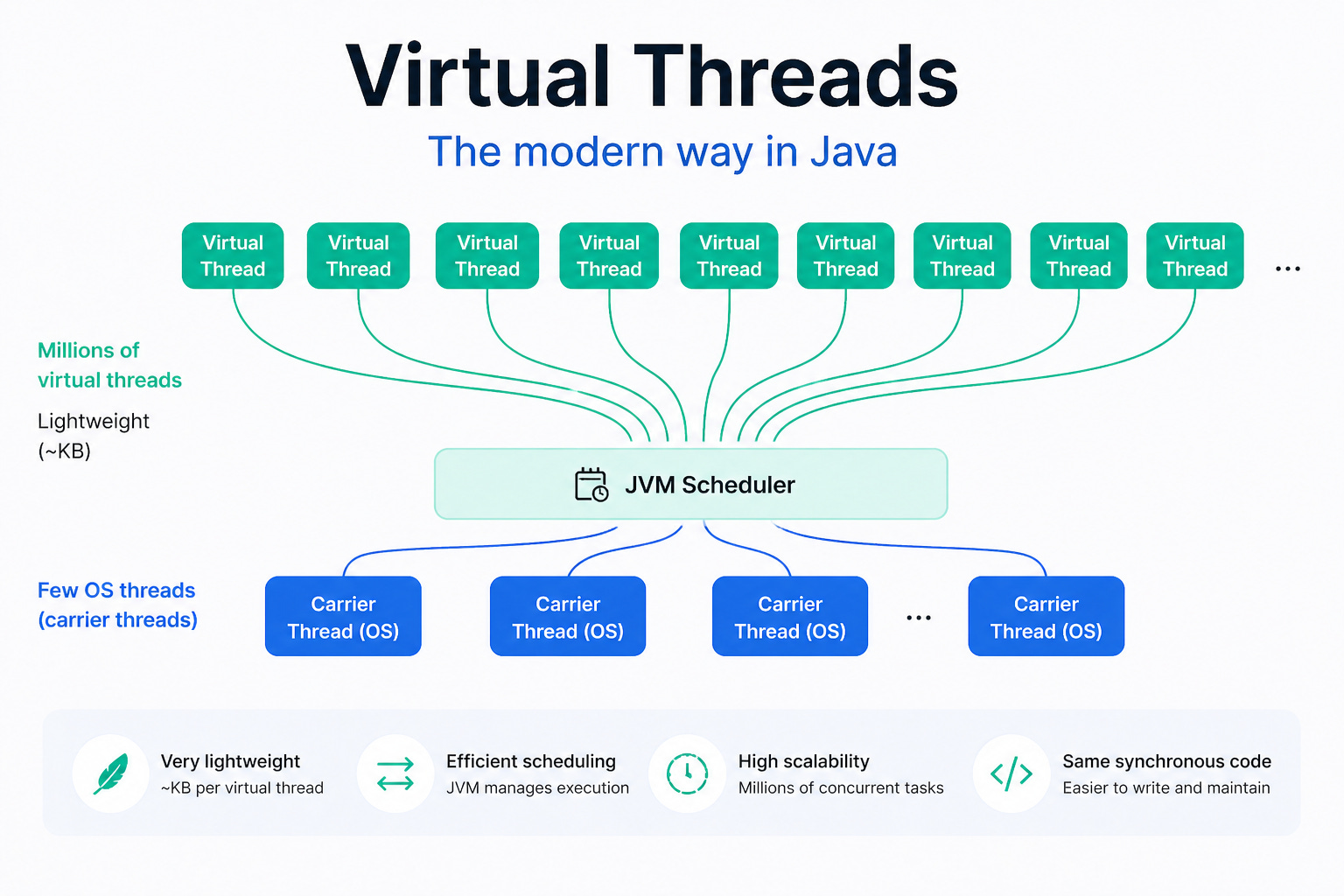
This brings a major benefit:
You can still write code in the familiar blocking style.
But the resource cost is much lower than traditional threads.
When I/O happens, a virtual thread can be paused so the carrier thread can be used by another task.
The best thing about Virtual Threads is that they allow Java to keep code simple while still scaling well for I/O-heavy workloads. That is why many developers — myself included — consider it one of the most important Java improvements in years.
Compared with reactive programming, Virtual Threads are usually easier for most developers to adopt because:
You do not need to fully switch to reactive thinking.
You do not need to chain callbacks or pipelines everywhere.
The code looks close to traditional synchronous style.
That said, Virtual Threads are still not a silver bullet for everything. They help a lot with I/O-bound workloads, but for heavy CPU-bound tasks, you still need proper architecture, task splitting, or parallel execution where appropriate.
Compared with Node.js
If we compare modern Java with Node.js, the discussion is no longer as simple as “Node.js is faster than Java for I/O-bound workloads.”
Node.js is still very strong in:
Fast startup
A simple event loop model
A unified JavaScript ecosystem from backend to frontend
Small, lightweight services that need fast responses
Meanwhile, Java now offers:
WebFlux for reactive, non-blocking programming
Virtual Threads for simple code that still scales well
A highly optimized JVM for long-running systems
So Java has become a very competitive option for I/O-bound workloads, especially when the team wants readable code, maintainability, and the strength of the Spring ecosystem.
5. Why is JavaScript different on the frontend and backend?
I’m not the only one who has asked this question. It is a very natural one, and it reveals a common misunderstanding: many people assume that if it is all JavaScript, it should behave the same everywhere. In reality, JavaScript itself is not the whole story. The runtime and the execution environment matter just as much.
JavaScript on the frontend and backend uses the same language, but they run in two different worlds:
The frontend runs in the browser runtime.
The backend runs in the Node.js runtime.
That difference is what gives them very different capabilities and limitations.
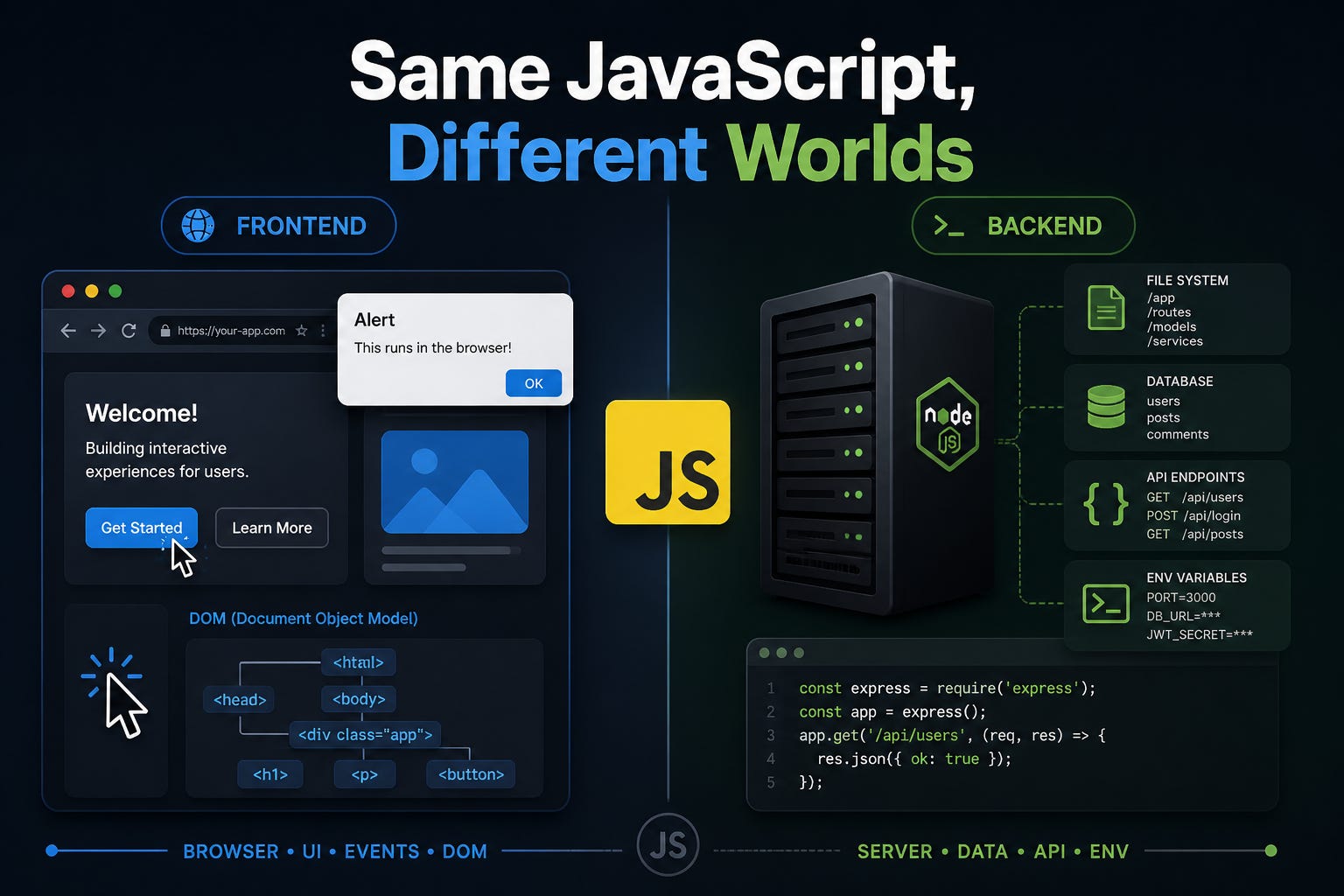
Frontend and backend use different runtimes
When you write frontend code with React, Vue, Angular, or plain JavaScript, your code runs in the browser. The browser provides many APIs for user interaction and UI work, such as:
alert()windowdocumentDOM manipulation
Mouse, keyboard, and scroll events
That is why alert() works in the frontend. It is part of the browser API, not part of JavaScript itself.
By contrast, when JavaScript runs in Node.js, it does not have objects like window or document. Node.js is designed for server environments, so it provides different APIs, such as:
Working with the filesystem
Handling network operations
Creating servers
Reading environment variables
Accessing process information
Using other server-side libraries
That is why you cannot call alert() in a Node.js backend. That API simply does not exist in that runtime.
Node.js is not “just JavaScript”
One easy misconception is to think that Node.js is simply “JavaScript running somewhere else.” In reality, Node.js is a runtime environment for JavaScript.
Besides the JavaScript engine itself, Node.js also comes with:
A runtime for executing code
A standard library for system-level tasks
npm, the most common package manager that comes with the ecosystem
Because of that, backend JavaScript can do things the browser cannot, such as reading files, creating a TCP server, or connecting to a database.
Why can’t the browser connect directly to a database?
Frontend applications cannot — and should not — connect directly to a production database for several reasons.
The first reason is security. If the browser could connect directly to the database, you would have to expose database credentials on the client side. That would be extremely dangerous, because users could inspect, modify, or abuse those credentials.
The second reason is system architecture. In modern web applications, the frontend and the database should not talk directly. Instead, the flow usually looks like this:
Frontend → Backend API → Database → Backend API → Frontend
This approach helps:
Protect sensitive credentials.
Control access permissions.
Handle validation.
Improve logging and auditing.
Keep client and server responsibilities separate.
So the most accurate thing to remember is this:
It is not JavaScript itself that decides what you can do — it is the runtime and the execution environment.
Conclusion
Looking back at these five questions, the most important thing is not deciding whether Node.js or Java is “better.” The real point is that each platform is strong in a different kind of workload. Node.js shines with the event loop, non-blocking I/O, fast startup, and a unified frontend-backend JavaScript ecosystem. Java, on the other hand, has come a long way with WebFlux and Virtual Threads, making it much more competitive for I/O-bound workloads than it used to be.
If you understand the real nature of the runtime, event loop, cluster, virtual threads, and the limitations of the browser compared with Node.js, it becomes much easier to choose the right technology for each situation. And instead of asking who is “better,” the more valuable question is: for this workload, this team, and this set of requirements, which choice is the least risky and the easiest to operate?
(If you enjoy these kinds of engineering stories, you can subscribe to receive the next ones.)