
Java Virtual Threads in Java 21: From Platform Threads to Scalable Concurrency
Discover how virtual threads in Java 21 work, why they scale better than platform threads, and when to use them instead of reactive code.

Concurrency in Java has long been a painful trade-off: either choose Platform Threads, which are easy to write but consume a lot of RAM and are hard to scale, or choose powerful Reactive code that makes your brain twist into knots.
Virtual Threads were created to end that trade-off. They let you handle millions of requests with the simplest synchronous coding style. Let’s explore everything from the traditional thread model to the real power of virtual threads to see why this is such a turning point for Java. Let’s begin :) :)

Platform Thread
Mechanism
Before talking about Virtual Threads, I need to understand how Java has handled threads up to now.
In Java, each thread you create (through java.lang.Thread) is almost mapped 1-to-1 with an operating system thread (OS thread). These threads are usually called platform threads. It sounds simple, but the cost is far from small.
Why are platform threads called “heavyweight”?
Each platform thread is not just a concept inside the JVM — it is tightly bound to operating system resources. When you create a thread, the operating system allocates a separate memory area for it called the thread stack. This is where the entire execution state of the thread is stored.
Inside this stack are stack frames — each frame corresponds to one function call. Each frame will contain:
Return address
Local variables
Parameters
Intermediate data used for execution
The stack works in the familiar LIFO (Last In, First Out) principle.
Call a function → push a frame onto the stack
End the function → pop the frame off the stack
The CPU uses a register called the stack pointer to track the “top” of the stack, and moves it up or down accordingly during push/pop operations.
Where is the problem?
The important point is: the stack size of each thread is decided as soon as the thread is created (for example through the JVM -Xss parameter). Even if some operating systems can allocate stack in a “use as you go” way (lazy allocation), each thread still has to reserve a maximum stack area in advance.
This leads to two major consequences:
Each thread consumes a significant amount of memory
The thread is managed directly by the OS scheduler → high context-switching cost
When you scale to tens of thousands or hundreds of thousands of concurrent tasks, this model starts to struggle
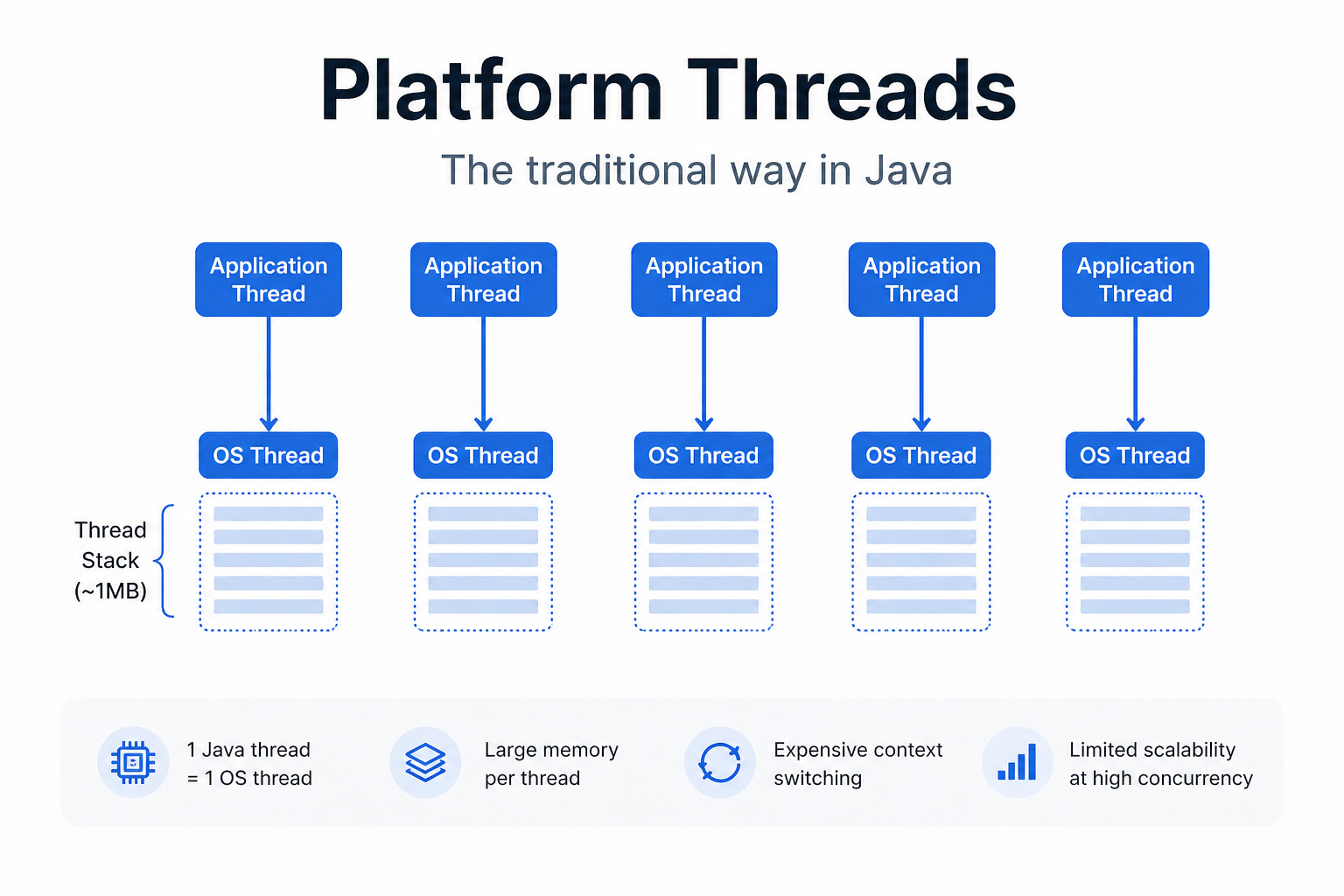
Problems with threads — when everything starts getting overloaded
The thread stack mechanism sounds neat, but in reality it hides quite a few problems.
StackOverflowError – a familiar error
One direct consequence is: if a program uses recursion without a proper stopping point, or has too many nested function calls, the number of stack frames keeps increasing. Eventually, when the number of frames exceeds the thread stack limit, the JVM throws:
StackOverflowError
The important thing to understand is that this error happens only on a specific thread, not because of the total number of threads in the system. It simply means that thread has run out of room to store more function calls.
OutOfMemoryError – when too many threads are created
On the other hand, the problem is no longer inside one thread, but in the number of threads. Each thread needs its own stack area, which by default is often around a few hundred KB to 1 MB (depending on the JVM and OS). When you create thousands or tens of thousands of threads, the total memory usage rises very quickly.
At some point, the system can no longer allocate a new thread, and you will get the error:
OutOfMemoryError: unable to create new native thread
This reminds us of something very practical: threads are not free.
Thread-per-request – a popular model with limits
Because of how platform threads work, traditional servers often use this model: one request = one thread. This is very intuitive, easy to code, easy to debug, and works well at moderate scale (a few hundred to a few thousand concurrent requests).
But when you scale to hundreds of thousands or millions of simultaneous requests, the problems become obvious:
Not enough memory to hold that many threads
Context switching between threads becomes extremely expensive
At that point, the system slows down, then eventually gets overwhelmed.
Reactive – a solution that is not easy to swallow
To get past those limits, a common path is Reactive Programming. Instead of “holding” a thread for the whole lifetime of a request, the system will:
Use non-blocking I/O
Release the thread while waiting (for example: waiting for a database or API)
Continue processing when data becomes available (event-driven)
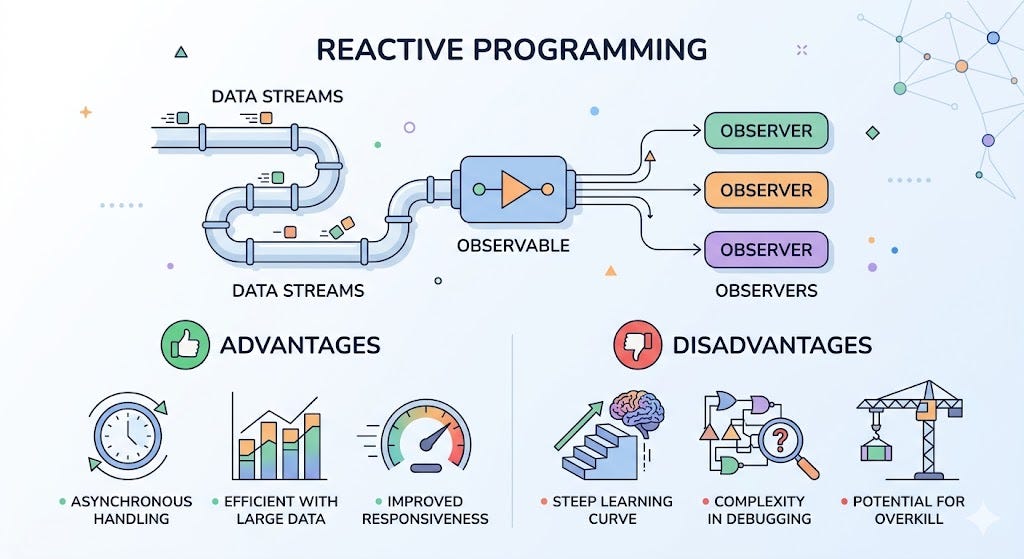
Thanks to that, a small number of threads can handle a very large number of requests at the same time. It sounds great, but the price is complexity. You no longer write code in a sequential (synchronous) style — you must switch to asynchronous thinking:
Code becomes harder to read (callback, chain, reactive stream…)
Debugging becomes harder (the flow is no longer linear)
Maintenance becomes difficult if the design is not tight
And this is exactly the point where many teams struggle when applying reactive programming in large systems.
Virtual threads
After all the limitations of platform threads, Virtual Threads appear as a very different approach. At the API level, everything still looks familiar: you still work with java.lang.Thread. But underneath, the operating model has changed completely.
No longer “one thread = one OS thread”
The biggest difference is: a virtual thread is no longer permanently tied to a single OS thread throughout its lifetime. Instead, the JVM acts like a smart scheduler. When a virtual thread runs, it is temporarily assigned to an OS thread (often called a carrier thread).
But when the virtual thread encounters a blocking operation (for example: calling a database, reading a file, calling an API…), the JVM can:
Pause that virtual thread
Release the OS thread
Use that OS thread to run another virtual thread
When the data becomes available, the original virtual thread will be resumed on an OS thread (which may not be the same one as before)
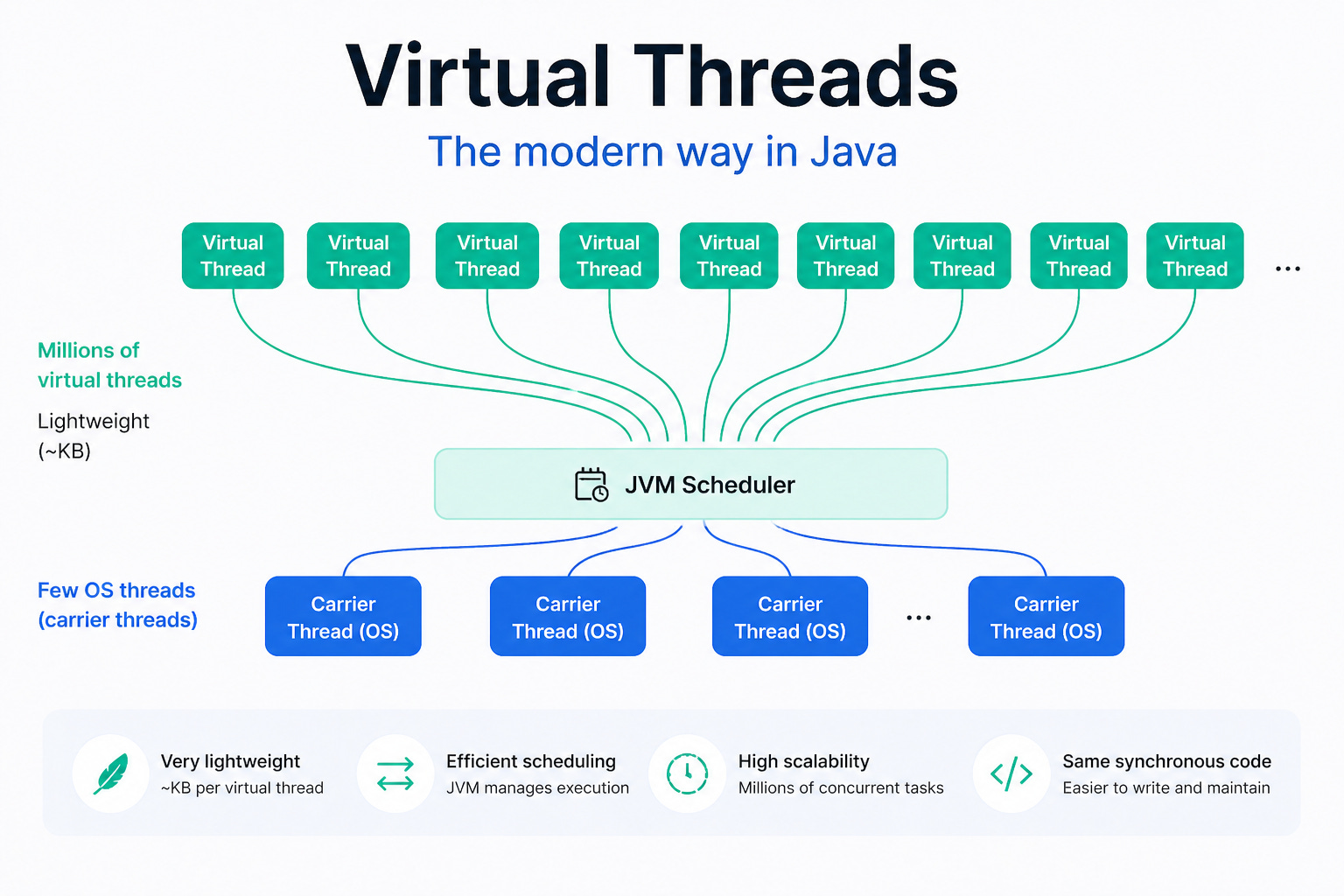
Fewer real threads, more work
With this mechanism, you no longer need:
10,000 OS threads to handle 10,000 requests
Just a small number of OS threads to handle a large number of virtual threads
In other words, the JVM is doing multiplexing: many virtual threads → few OS threads
Cheap enough to use freely
Because it no longer needs a fixed native stack like a platform thread, a virtual thread has extremely low creation cost. You can create hundreds of thousands or even millions of virtual threads while still staying within acceptable resource limits — something almost impossible with platform threads. This is especially useful for systems with:
Lots of I/O
Lots of waiting time (waiting time greater than CPU time)
Similar to virtual memory
If this concept feels a bit “magic,” think of it like this: Virtual Threads are similar to how virtual memory works. Instead of forcing the program to deal directly with limited physical resources (RAM or OS threads), the JVM creates an abstraction layer:
Hides the real limits
Distributes resources more flexibly
Makes the most of what is available
The result is that you feel like resources are almost infinite, while underneath everything is still carefully optimized.
How virtual threads work
A virtual thread is not a standalone “real” thread, but is placed into an internal scheduling mechanism by the JVM.
You can picture it simply: the JVM keeps a queue of virtual threads ready to run. When an OS thread (carrier thread) becomes free, the JVM mounts a virtual thread onto it for execution.
Mount / Unmount
During execution, a virtual thread continuously goes through two states:
Mount: attached to a carrier thread to run
Unmount: detached when it hits a point where it must wait (blocking I/O, sleep, …)
The interesting part is: when a virtual thread is unmounted, the carrier thread is not kept waiting. Instead, that OS thread is immediately returned to the JVM to run another virtual thread. The original virtual thread simply waits until it is ready again, then gets mounted later.
Using resources efficiently
Thanks to this mechanism, a small number of OS threads can rotate to serve many virtual threads. Compared to the thread-per-request model:
No thread is occupied doing nothing while waiting for I/O
CPU is used more continuously and efficiently
The number of required OS threads drops sharply, saving operating system resources
In other words, the system no longer wastes resources just by waiting.
Code stays sync, runtime is very async
One extremely valuable point is: developers do not need to change how they write code. You can still write code in this style:
Call functions sequentially
Use blocking I/O normally
But underneath, the JVM is silently:
Pausing the thread when needed
Switching to another task
Returning to the exact spot to continue
That means: the experience feels synchronous, but the performance is close to async.
A common misunderstanding is that each virtual thread is assigned to the “least busy” OS thread. That is not actually how it works. The JVM does not fix this mapping. Instead, it continuously:
Schedules
Pauses
Resumes virtual threads
depending on each thread’s execution state. This flexibility is the key that helps virtual threads work well in systems with:
Lots of I/O
Many concurrent requests
Waiting time taking up most of the workload
Virtual thread context switching is lighter
When people hear “context switching”, they often think it simply means changing the currently running thread. But with OS threads, the story is much heavier.
OS thread context switch – where is the cost?
With traditional threads, every context switch requires the operating system to jump into kernel space. It is not just a matter of stopping thread A and running thread B — it also includes:
Saving the entire CPU state of the current thread
Restoring the state of the next thread
Updating kernel management structures
Affecting CPU cache performance (the cache gets “cold”)
If this happens repeatedly, the accumulated cost becomes very large and drags down system throughput.
Virtual threads – moving the work into the JVM
Virtual threads work differently. Instead of pushing the context-switching burden down into the kernel, the JVM handles most of this logic in user space. When a virtual thread hits blocking work (I/O, sleep,…), the JVM will:
“Freeze” (park) the virtual thread
Store the necessary state in JVM memory
Unmount it from the carrier thread
Most importantly: all of this happens without kernel intervention. The carrier thread is immediately reused to run another virtual thread, without going through a heavy OS-thread-style context switch.
No need to carry the whole “machine” like an OS thread
An OS thread always comes with a fixed native stack, and its state is always tied to the kernel. In contrast, a virtual thread does not need to keep a native stack for its entire lifetime and only stores what is necessary to resume execution.
Simply put:
OS thread = carries the whole machine
Virtual thread = carries only the enough-to-resume state
Therefore, pausing and resuming a virtual thread is much lighter. One important thing to understand correctly: virtual threads do not eliminate context switching. They only:
Reduce the number of times kernel-level switching is needed
Move most scheduling work into the JVM
Optimize for the “run → wait → run again” pattern
In I/O-heavy systems, this is a huge difference. You can think of it like this:
OS thread: every time you switch tasks, you have to “ask the operating system for permission,” go through all the procedures → expensive
Virtual thread: the JVM handles internal scheduling itself, using OS threads only as temporary workers → faster and more flexible
So virtual threads are not “more magical,” but simply avoid unnecessary expensive costs.
Examples
Platform Thread
import java.net.URI;
import java.net.http.HttpClient;
import java.net.http.HttpRequest;
import java.net.http.HttpResponse;

public class PlatformThreadExample {

    private final HttpClient client = HttpClient.newHttpClient();

    public String getCombinedData() throws Exception {
        String user = call("https://api.example.com/user/1");
        String orders = call("https://api.example.com/orders/1");
        return user + " | " + orders;
    }

    private String call(String url) throws Exception {
        HttpRequest request = HttpRequest.newBuilder()
                .uri(URI.create(url))
                .GET()
                .build();

        HttpResponse<String> response = client.send(request, HttpResponse.BodyHandlers.ofString());
        return response.body();
    }

    public static void main(String[] args) throws Exception {
        PlatformThreadExample app = new PlatformThreadExample();
        System.out.println(app.getCombinedData());
    }
}
Here, client.send(...) is a blocking call. The running thread is held until the HTTP response returns, so if there are many concurrent requests, you will need many platform threads.
Reactive programming
The example below uses Spring WebFlux / Reactor. The goal is not to block a thread while waiting for I/O, but to chain processing steps using Mono.
import org.springframework.web.reactive.function.client.WebClient;
import reactor.core.publisher.Mono;

public class ReactiveExample {

    private final WebClient webClient = WebClient.create();

    public Mono<String> getCombinedData() {
        Mono<String> userMono = webClient.get()
                .uri("https://api.example.com/user/1")
                .retrieve()
                .bodyToMono(String.class);

        Mono<String> ordersMono = webClient.get()
                .uri("https://api.example.com/orders/1")
                .retrieve()
                .bodyToMono(String.class);

        return userMono.zipWith(ordersMono, (user, orders) -> user + " | " + orders);
    }

    public static void main(String[] args) {
        ReactiveExample app = new ReactiveExample();

        app.getCombinedData()
                .subscribe(System.out::println);

        try {
            Thread.sleep(3000);
        } catch (InterruptedException ignored) {
        }
    }
}
Here, Mono does not represent a value that is immediately available, but a pipeline that will complete after. The code does not block a thread while waiting for the HTTP response, and the reactive framework will coordinate the continuation when data becomes available.
Virtual Thread
This example keeps the synchronous coding style like platform threads, but runs on virtual threads.
import java.net.URI;
import java.net.http.HttpClient;
import java.net.http.HttpRequest;
import java.net.http.HttpResponse;
import java.util.concurrent.ExecutorService;
import java.util.concurrent.Executors;

public class VirtualThreadExample {

    private final HttpClient client = HttpClient.newHttpClient();

    public String getCombinedData() throws Exception {
        String user = call("https://api.example.com/user/1");
        String orders = call("https://api.example.com/orders/1");
        return user + " | " + orders;
    }

    private String call(String url) throws Exception {
        HttpRequest request = HttpRequest.newBuilder()
                .uri(URI.create(url))
                .GET()
                .build();

        HttpResponse<String> response = client.send(request, HttpResponse.BodyHandlers.ofString());
        return response.body();
    }

    public static void main(String[] args) {
        VirtualThreadExample app = new VirtualThreadExample();

        try (ExecutorService executor = Executors.newVirtualThreadPerTaskExecutor()) {
            executor.submit(() -> {
                try {
                    System.out.println(app.getCombinedData());
                } catch (Exception e) {
                    throw new RuntimeException(e);
                }
            });
        }
    }
}
The important point is that the business logic is almost unchanged compared with platform threads, but instead of being “stuck” on an OS thread while waiting for I/O, the virtual thread can be temporarily parked by the JVM so the carrier thread can do other work.
Notes and Best practices
Even though virtual threads are very powerful, there are a few important points to understand correctly so you do not use them the wrong way.
Still a Thread, but don’t treat it like the old kind
A virtual thread is still a Thread, so you can use start(), join(), and so on as usual. However, that does not mean it behaves like a platform thread. Older APIs like stop() and suspend(), which have long been dangerous and deprecated, should be avoided even more with virtual threads.
Concurrency problems do not disappear
Virtual threads do not change the nature of concurrent programming. The usual problems still remain:
Race condition
Deadlock
Visibility
Atomicity
In other words: virtual threads help you run more work at once. But they do not make your code automatically correct. You still have to:
Use locks when needed
Ensure safe publication
Design shared state carefully
The JVM will not “keep waiting” for virtual threads
One thing that can be surprising: a virtual thread does not keep the JVM alive the way a non-daemon platform thread does. That means if the main thread ends, the JVM may shut down even while virtual threads are still running.
So for important tasks (writing data, processing transactions, sending events…), you need to:
Join explicitly
Or manage lifecycle clearly (for example with executors, structured concurrency, …)
Do not rely on threads the way you used to.
Pinning – when a virtual thread gets “stuck” to an OS thread
In some situations, a virtual thread cannot unmount from its carrier thread. When that happens, it is called pinned. Typical cases include:
Running inside a
synchronizedblock/method and then hitting blocking codeCalling a native method or foreign function
When pinned, the carrier thread is kept occupied and cannot be returned to the JVM scheduler, which reduces the ability to scale significantly. Simply put: you end up close to the traditional thread model again, but without noticing it. For that reason, if your code uses a lot of synchronized, you should re-check:
Do you really need the lock? Are you holding the lock while calling I/O?
Some ways to improve:
Use
ReentrantLock(more flexible)Avoid holding locks while waiting (I/O, sleep, …)
Redesign to reduce shared state
It is not that synchronized is forbidden, but you should not let the virtual thread remain tightly held while waiting.
Do not pool virtual threads
Another important principle is: do not pool virtual threads. This is a habit that is very easy to bring over from traditional threads — and it is wrong.
Pooling makes sense when threads are expensive resources, but virtual threads are not expensive in that way. The better model is to create one virtual thread per task, then let the JVM handle their execution.
In other words, if your task is the unit of work, the virtual thread should be treated as an abstraction for that task, not as a precious worker that must be kept for reuse.
Be careful with ThreadLocal
With platform threads, ThreadLocal is sometimes a convenient way to attach data to a thread. But with virtual threads, the number of threads can be very large, so if you abuse ThreadLocal, you can accidentally increase memory usage quickly and make the code harder to control.
If your goal is to limit access to a finite resource such as a database connection, a semaphore is often clearer and more direct.
Do not combine with parallel streams
A common misunderstanding is:
Virtual thread + parallel stream = faster
Parallel streams are mainly designed for CPU-bound workloads and usually rely on ForkJoinPool, while virtual threads are strongest for I/O-bound workloads where most of the time is spent waiting.
The two do not conflict, but they do not naturally amplify each other either. Unless there is a clear reason, combining them usually does not improve performance and can even make the system less predictable.
Conclusion
In short, virtual threads do not replace every concurrency model, but they are a major step forward for Java in keeping code readable while still scaling well. Used in the right place, they reduce complexity without forcing developers into a heavy asynchronous architecture.
If you’re using Java 21 or later, virtual threads are officially ready to use. If you’re still using an older version, are you ready to upgrade your Java version ? :D :D
(If you enjoy these kinds of engineering stories, you can subscribe to receive the next ones.)